


クイック検索
ペンタブレット
液晶ペンタブレット
3Dプリンター
アクセサリー
あなたの国/地域を選択してください
North America
South America
Oceania
Europe
クイック検索
ペンタブレット
液晶ペンタブレット
3Dプリンター
アクセサリー
あなたの国/地域を選択してください
North America
South America
Oceania
Europe
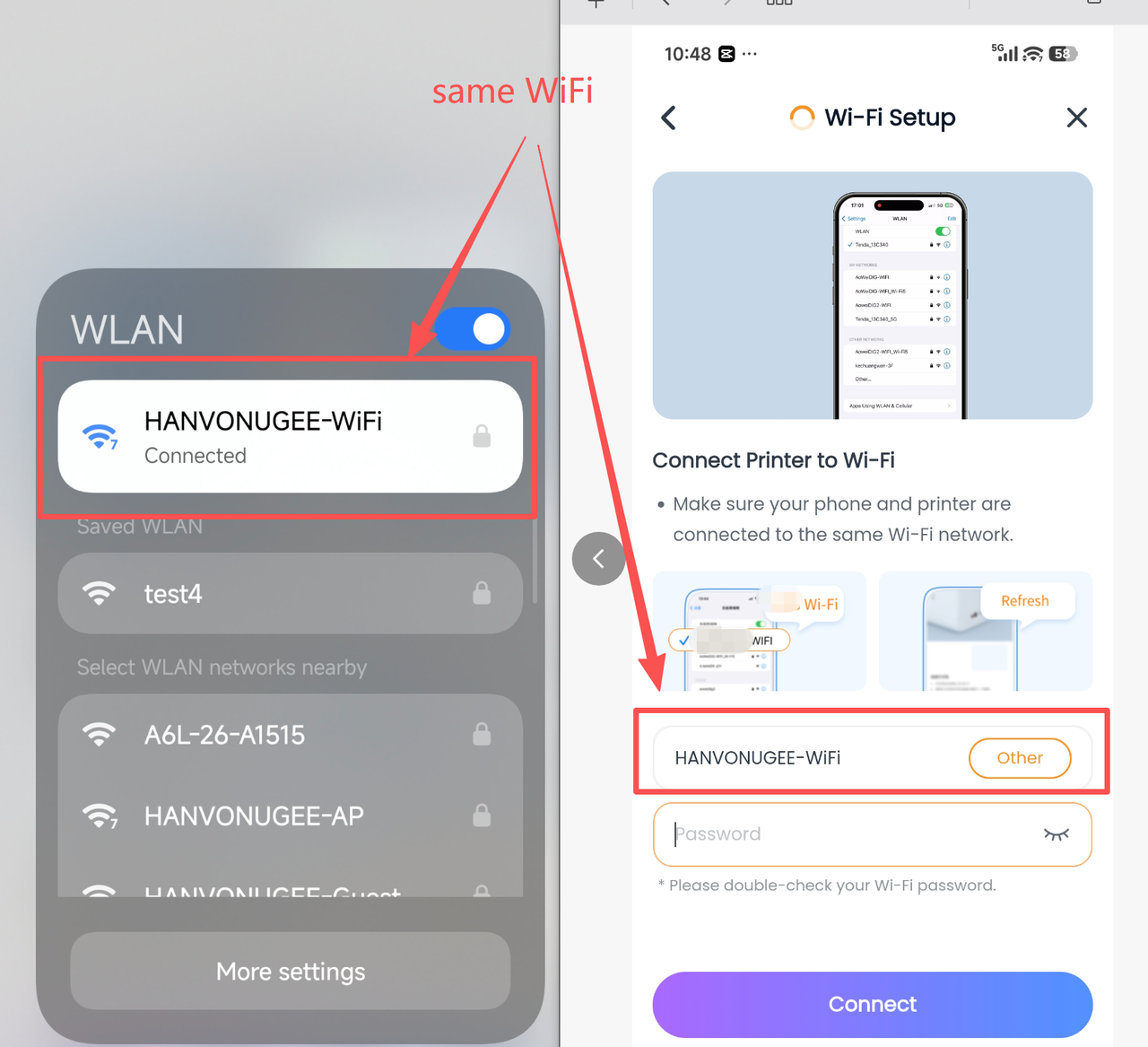
Detected that the phone and printer are not on the same WiFi network?
The ugee Ufun app on phone/tablet/PC that controls the printer must be on the same WiFi network as the printer;
Step 1: Check which WiFi your phone/tablet/PC ugee Ufun is connected to;
Step 2: When performing connection and network configuration, select the same WiFi as your phone/tablet/PC ugee Ufun, and enter the correct password;
あなたの国/地域を選択してください
North America
South America
Oceania
Europe