


クイック検索
ペンタブレット
液晶ペンタブレット
3Dプリンター
アクセサリー
あなたの国/地域を選択してください
North America
South America
Oceania
Europe
クイック検索
ペンタブレット
液晶ペンタブレット
3Dプリンター
アクセサリー
あなたの国/地域を選択してください
North America
South America
Oceania
Europe
How to fix stringing in 3D prints?
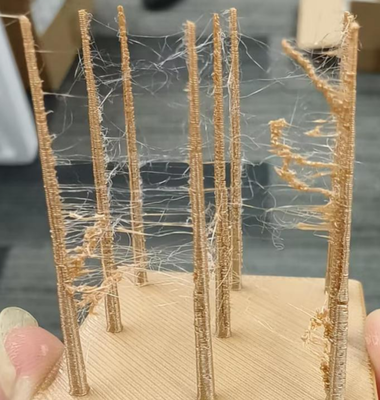
Stringing may occur when the print head travels a long distance within a layer.
1. Print temperature too high: Refer to the User Manual Section 3.1.2 Advanced Printing to reduce the nozzle temperature.
2. Damp or degraded filament: Using degraded or moisture-absorbed filament can cause uneven flow and stringing. Replace the filament and try again.
あなたの国/地域を選択してください
North America
South America
Oceania
Europe